Signalwise Picks
Browse
Wired networking

Structured Media Enclosure Buying Guide: Size, Wireless, Power, and Service Access

Current retailer option

Legrand On-Q ENP3050NA 30-Inch Plastic Structured Media Enclosure with Trim Ring and Hinged Door

Check current price & availability on Amazon

Current price & availability · purchase link

Compare picks

Open the exact family listing to compare the live price, availability, delivery, seller, and returns.

Choose an in-wall media enclosure by stud bay, device footprint, cable bend radius, ventilation, listed power accessories, wireless placement, door depth, and future service space.

Prepared by the Signalwise Picks editorial deskUpdated August 10, 2026

Quick answer

The practical answer

Make a scaled layout of the actual devices, power supplies, cable entries, bend radii, and service loops before choosing enclosure height. Keep radio-sensitive equipment out of a metal box, or choose a wireless-transparent enclosure only after checking heat and coverage. Reserve space for listed power hardware and for hands to disconnect every cable later.

Common buying question

What size structured media enclosure do I need for a router, switch, coax, fiber handoff, and home Ethernet wiring?

The existing rack guide assumes open rack units and shelves; it does not solve stud-bay dimensions, flush doors, in-wall cable entries, plastic radio transparency, or enclosure-specific mounting modules.

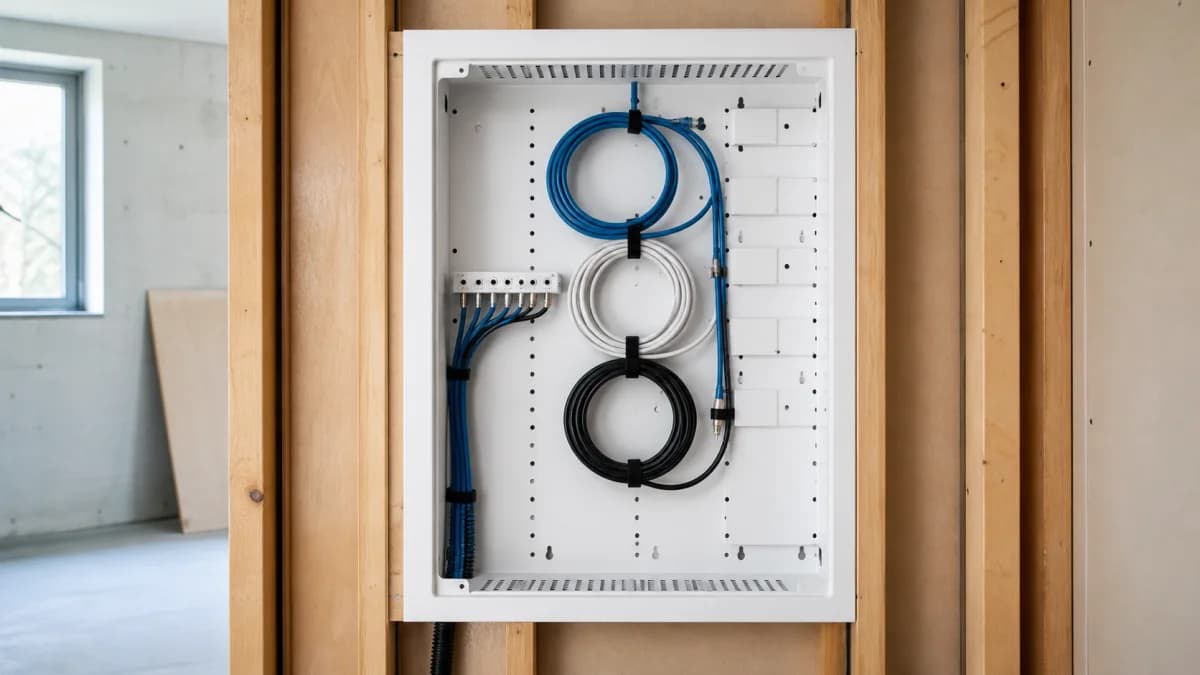
Editorial open structured media enclosure with neatly routed Ethernet and coax service loops and spare mounting space
Original editorial image for category, fit, and use context; verify the exact linked product appearance and configuration on the retailer page.

Lay out the installed system before picking a height

List the fiber or coax handoff, modem or ONT, router, switch, splitters, patch points, power modules, adapters, and cable loops. Draw the connected dimensions, not bare device dimensions. A compact switch that fits on paper can become unserviceable once front-facing patch cords, a rear power connector, and the path needed to remove it are included.

Treat power as an enclosure design constraint

Use only power modules, receptacles, and mounting methods permitted for the enclosure and installation. Do not bury ordinary power strips or unsupported adapters inside a wall. Map the upstream circuit and any backup-power requirement. When mains work, new receptacles, or code interpretation is involved, use a qualified electrician rather than improvising around the low-voltage cabinet.

Plastic helps radios but does not guarantee coverage

A wireless-transparent plastic door avoids the shielding effect of a steel cabinet, yet radios can still be compromised by wall location, wiring, power supplies, neighboring ductwork, and heat. Test Wi-Fi and smart-home coverage with the equipment in its final position and the door closed. Ceiling or room access points are usually easier to place for intentional coverage.

Budget for heat and passive airflow

Modems, routers, PoE switches, power supplies, and ONTs create continuous heat. Add their stated power draw, inspect the enclosure's ventilation design, and consider the wall's ambient conditions. A box that is tidy but hot can shorten equipment life or trigger throttling. High-power PoE and fan-cooled equipment often belong in an open, ventilated rack.

Design for the next service visit

Leave enough slack to swing out or remove equipment without unplugging unrelated circuits, while respecting bend radius. Label both cable ends, ports, power adapters, and upstream services. Photograph the finished layout and keep the module list nearby. Choose a larger enclosure when the smaller size only works by stacking devices or hiding connectors behind permanent hardware.

Current Amazon option

Check this exact product

Legrand On-Q ENP3050NA 30-Inch Plastic Structured Media Enclosure with Trim Ring and Hinged Door

ASIN
B082B5GYFD
Brand
Legrand On-Q
Listing checked
8/10/2026

Compare the current title, ASIN, variant, seller, stock, shipping, price, and return path before ordering.

Side-by-side checks

Enclosure sizing inputs that product photos hide

CheckMeasureDecision it controls
Wall cavityStud spacing, depth, obstructions, drywall openingWhether the box can recess safely and the trim ring can cover the cutout.
Device envelopeBody, antennas, plugs, connectors, and removal pathWhether equipment fits after cables and power bricks are attached.
Cable entryCount, direction, bend radius, service loopWhether terminations can be made without sharp bends or blocked ports.
PowerListed enclosure module, receptacle, adapters, UPS planWhether mains power is installed and used as the enclosure permits.
HeatCombined device load, ventilation, ambient wall temperatureWhether active electronics belong in the box at all.
WirelessEnclosure material, antenna position, coverage testWhether Wi-Fi, Thread, Zigbee, or cellular radios should be relocated.

Primary sources

References used for this guide

Public owner context

Questions to answer before buying

Community discussions help surface installation, fit, maintenance, and failure questions. They are anecdotal context, not product specifications or a substitute for current instructions.

  • Reddit r/HomeNetworking

    Structured media cabinet planning discussions

    Used as a live index of recurring questions about enclosure size, heat, power bricks, switches, and moving Wi-Fi outside; individual anecdotes are not product proof.

How this page was governed

Page-specific editorial method

  1. 1.Build a paper or CAD layout using the exact device and connector dimensions, not enclosure marketing capacity.
  2. 2.Separate low-voltage routing from mains-power installation and follow the enclosure instructions and local code.
  3. 3.Test wireless coverage and thermal behavior with the door closed before calling the installation complete.
  4. 4.Require labels, photographs, and a service path for every device, module, and cable entering the enclosure.

Related guide

Home Network Racks Buying Guide

Which home network racks are worth buying when the real job is to mount network equipment with safe airflow, cable service loops, and room for maintenance? This guide turns that question into model-level checks, a reversible setup, a first-year ownership plan, and a clear skip decision.

Related guide

Ethernet Patch Panels Buying Guide

Which ethernet patch panels are worth buying when the real job is to terminate permanent room cables into labeled, serviceable ports? This guide turns that question into model-level checks, a reversible setup, a first-year ownership plan, and a clear skip decision.

Related guide

Cat6 vs Cat6A vs Flat Ethernet Cable: What to Buy for Home

Choose Cat6, Cat6A, flat cable, or short patch cables by run length, placement, speed target, and damage risk.

Related guide

Home Ethernet Switch Buying Guide: Gigabit, 2.5G and Smart Features

Pick a home Ethernet switch by port count, speed, fanless operation, VLAN needs, desk placement, and room to grow.

Related guide

USB-C Ethernet Adapter vs Dock: What to Buy for a Laptop

Decide between a simple Ethernet dongle, USB-C hub, or full dock by display, charging, laptop support, and desk workflow.

Related guide

Ethernet Stuck at 100 Mbps? Fix Cable, Port or Adapter

Use the negotiated link speed to isolate a bad cable, 100 Mbps port, wall jack, dock, adapter, or auto-negotiation fault before buying new network gear.

Related guide

NETGEAR GS908E Review: Smart Managed Plus or Old Gigabit Switch?

Check GS908E's eight gigabit ports, smart management, cable routing, hardware region, and whether GS308E or 2.5GbE is the better buy.

Related guide

Deco BE63 2.5GbE Ports Explained: WAN, LAN, Switches and Backhaul

Plan the four auto-sensing ports around a multi-gig internet connection, wired backhaul, office devices, and the real bottleneck in the path.

Related comparison

Best Wired Home Network Upgrades: Switches, Cables & Hubs

Compare home switches, Cat6/Cat6A cables, and USB-C Ethernet adapters before replacing a router that is not the real bottleneck.

Structured Media Enclosure Buying Guide: Size, Wireless, Power, and Service Access