Signalwise Picks
Browse
Wired networking

Rackmount PDU Buying Guide: Outlets, Load, Surge Protection, and UPS Fit

Current retailer option

APC BE600M1 Back-UPS 600VA

Open the exact family listing to compare the live price, availability, delivery, seller, and returns.

Choose a rack PDU by circuit capacity, plug and outlet layout, protection role, mounting direction, cord reach, and the UPS or wall circuit feeding it.

Prepared by the Signalwise Picks editorial deskUpdated August 10, 2026

Quick answer

The practical answer

Use a listed rack PDU to distribute one correctly sized circuit across reachable outlets; do not assume it supplies battery backup or surge protection. Map plug types, continuous load, mounting position, cord path, and the upstream UPS before choosing outlet count.

Common buying question

What rackmount PDU should I use for a home network rack, and does it replace a UPS or surge protector?

Existing UPS content focuses on runtime and modem/router continuity rather than rack outlet orientation, input plug, branch-circuit load, and PDU protection class.

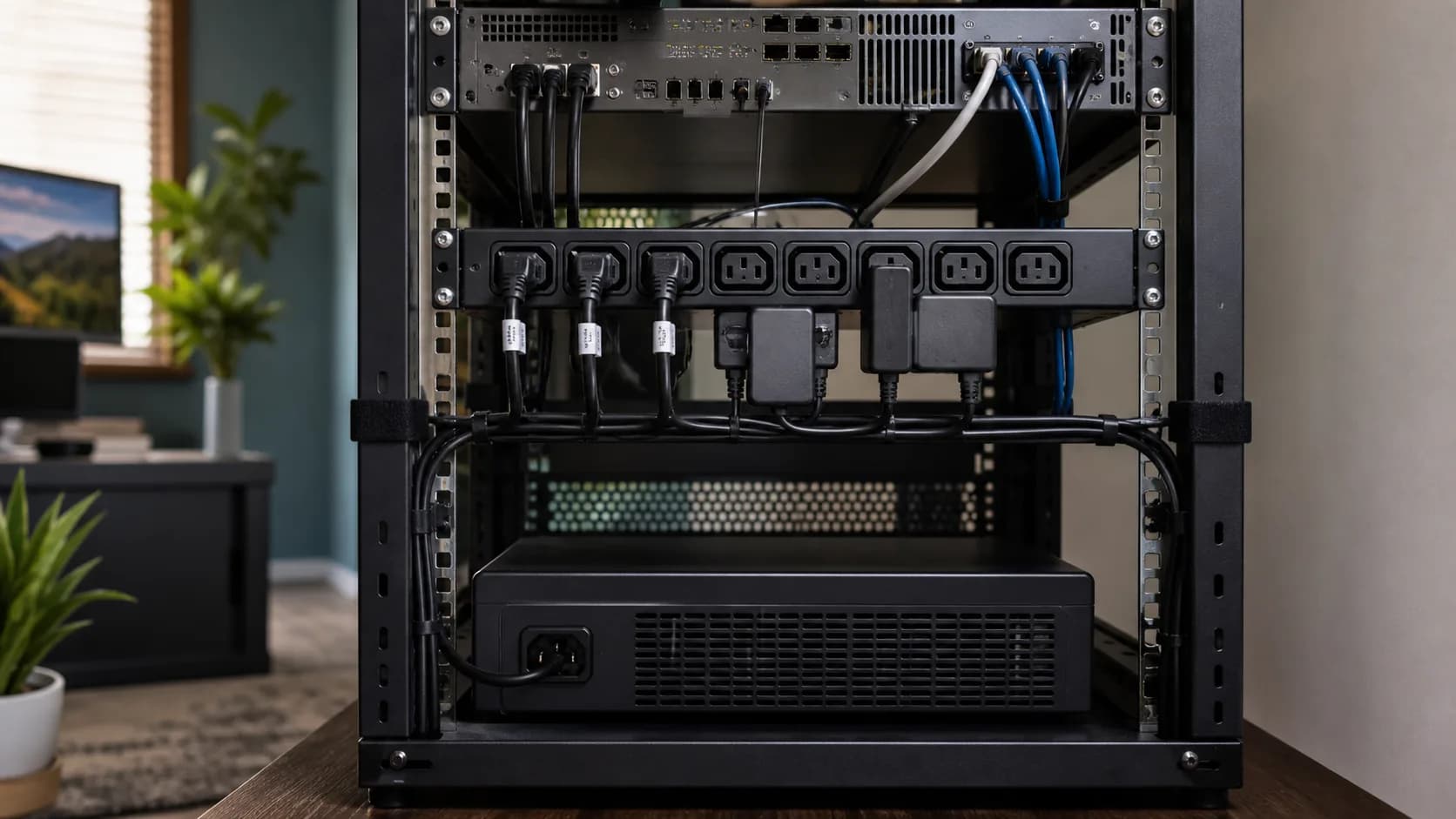
Editorial equipment rack scene representing rack power distribution planning
Original editorial image for category, fit, and use context; verify the exact linked product appearance and configuration on the retailer page.

Decide what the PDU is supposed to do

A basic PDU distributes power. Some models add surge suppression, local metering, remote outlet switching, or environmental monitoring, while a UPS adds battery-backed power and voltage behavior of its own. Write the required job first so a row of outlets is not mistaken for protection the model never claims.

Calculate the whole upstream load

Record the wall circuit, receptacle, input plug, UPS output limit if used, PDU rating, and every connected device. Allow for continuous-load guidance, startup behavior, and future equipment. Do not daisy-chain power strips or use plug adapters to make an incompatible layout appear to fit; follow the current electrical code and product instructions.

Model power bricks in three dimensions

Outlet count is misleading when wide adapters cover neighbors or cable exits collide with the rack door. Lay out each plug, brick, and service loop at scale. Rear-facing outlets can clean up the front but must remain reachable for labeling, inspection, and emergency disconnection.

Mount without creating heat or cable strain

Confirm 1U or vertical compatibility, rack depth, bracket orientation, cord reach, ventilation, and bend radius. Keep low-voltage data cabling organized separately from mains power where practical. The breaker, power switch, and upstream disconnect should remain visible and documented after the rack is populated.

When an ordinary strip or UPS outlet group is enough

Skip a rack PDU when there are only a few low-power devices outside a rack and a correctly rated, listed surge protector reaches them safely. Use UPS outlets directly when the unit's layout, load rating, and supported connection policy already fit. A PDU is valuable for distribution and serviceability, not because rack mounting makes electricity safer by itself.

Current Amazon option

Check this exact product

CyberPower CPS1215RMS 1U Rackmount Surge Protector with 12 Outlets and 15-Foot Cord

ASIN
B00077INZU
Brand
CyberPower
Listing checked
8/10/2026

Compare the current title, ASIN, variant, seller, stock, shipping, price, and return path before ordering.

Side-by-side checks

Rack PDU decisions beyond outlet count

CheckVerifyReject or change course when
InputVoltage, amperage, plug type, cord lengthThe plug or circuit does not match without an improvised adapter.
LoadNameplate and measured equipment loadThe planned continuous load leaves inadequate circuit headroom.
ProtectionBasic, metered, switched, surge, or UPS-fedThe product is being asked to provide a protection function it does not list.
Outlet geometryBrick clearance, spacing, front or rear accessPower adapters block adjacent outlets or obstruct service.
Mounting1U, zero-U, depth, brackets, cable strainThe rack position creates tight bends, heat, or inaccessible plugs.
RecoveryBreaker access, labeling, shutdown orderA fault would require guessing which device or upstream circuit to disconnect.

Primary sources

References used for this guide

Public owner context

Questions to answer before buying

Community discussions help surface installation, fit, maintenance, and failure questions. They are anecdotal context, not product specifications or a substitute for current instructions.

  • Reddit r/HomeNetworking

    Home rack PDU selection discussion

    Used to surface practical questions about rear mounting, wall plugs, UPS chaining, and adapter clearance; anecdotes are not treated as electrical approval.

How this page was governed

Page-specific editorial method

  1. 1.Map the upstream circuit, UPS, PDU, and every attached load as one electrical path.
  2. 2.Use manufacturer nameplate values and an electrician where branch-circuit suitability is uncertain.
  3. 3.Classify protection features explicitly instead of treating every rack power strip as equivalent.
  4. 4.Verify listing identity and included mounting hardware again at publication time.

Related guide

Home Network Racks Buying Guide

Which home network racks are worth buying when the real job is to mount network equipment with safe airflow, cable service loops, and room for maintenance? This guide turns that question into model-level checks, a reversible setup, a first-year ownership plan, and a clear skip decision.

Related guide

Router UPS Runtime: Size Backup Power for Modem, ONT and Mesh

Measure the complete network load, separate protected from surge-only outlets, and estimate runtime without turning VA or half-load figures into false promises.

Related guide

Cat6 vs Cat6A vs Flat Ethernet Cable: What to Buy for Home

Choose Cat6, Cat6A, flat cable, or short patch cables by run length, placement, speed target, and damage risk.

Related guide

Home Ethernet Switch Buying Guide: Gigabit, 2.5G and Smart Features

Pick a home Ethernet switch by port count, speed, fanless operation, VLAN needs, desk placement, and room to grow.

Related guide

USB-C Ethernet Adapter vs Dock: What to Buy for a Laptop

Decide between a simple Ethernet dongle, USB-C hub, or full dock by display, charging, laptop support, and desk workflow.

Related guide

Ethernet Stuck at 100 Mbps? Fix Cable, Port or Adapter

Use the negotiated link speed to isolate a bad cable, 100 Mbps port, wall jack, dock, adapter, or auto-negotiation fault before buying new network gear.

Related guide

NETGEAR GS908E Review: Smart Managed Plus or Old Gigabit Switch?

Check GS908E's eight gigabit ports, smart management, cable routing, hardware region, and whether GS308E or 2.5GbE is the better buy.

Related guide

Deco BE63 2.5GbE Ports Explained: WAN, LAN, Switches and Backhaul

Plan the four auto-sensing ports around a multi-gig internet connection, wired backhaul, office devices, and the real bottleneck in the path.

Related product guide

APC BE600M1 Back-UPS 600VA

A compact 600VA/330W UPS guide for an ONT, modem, router, and one small switch, with five battery-backed outlets, two surge-only outlets, one USB port, and a replaceable-battery path.

Related comparison

Best UPS for Router, Modem and ONT Backup Power

Compare APC BE600M1, BE850G2, and CyberPower SL700U by measured load, protected outlets, power-brick fit, battery replacement, and installation space.

Related comparison

Best Wired Home Network Upgrades: Switches, Cables & Hubs

Compare home switches, Cat6/Cat6A cables, and USB-C Ethernet adapters before replacing a router that is not the real bottleneck.

Rackmount PDU Buying Guide: Outlets, Load, Surge Protection, and UPS Fit